postgres-scaling-lab
Postgres Scaling Lab
When the database behind a program feels slow, the tempting move is to buy a different kind of database; this studies how far the one you already have can go. Adding an index, the same idea as a book's index, cut a common lookup from reading all 2,494 blocks of the table to reading 4. Splitting one table up by date, reported honestly, made another lookup about 70 percent slower.
Built solo by our founder, Salman Adnan, for an Enterprise Software Development course against course-provided scaffolding; his work is the solution SQL, the replication setup, the routing app, and the analysis. Docker was unavailable on the latest machine, so the numbers come from the original course Docker runs.
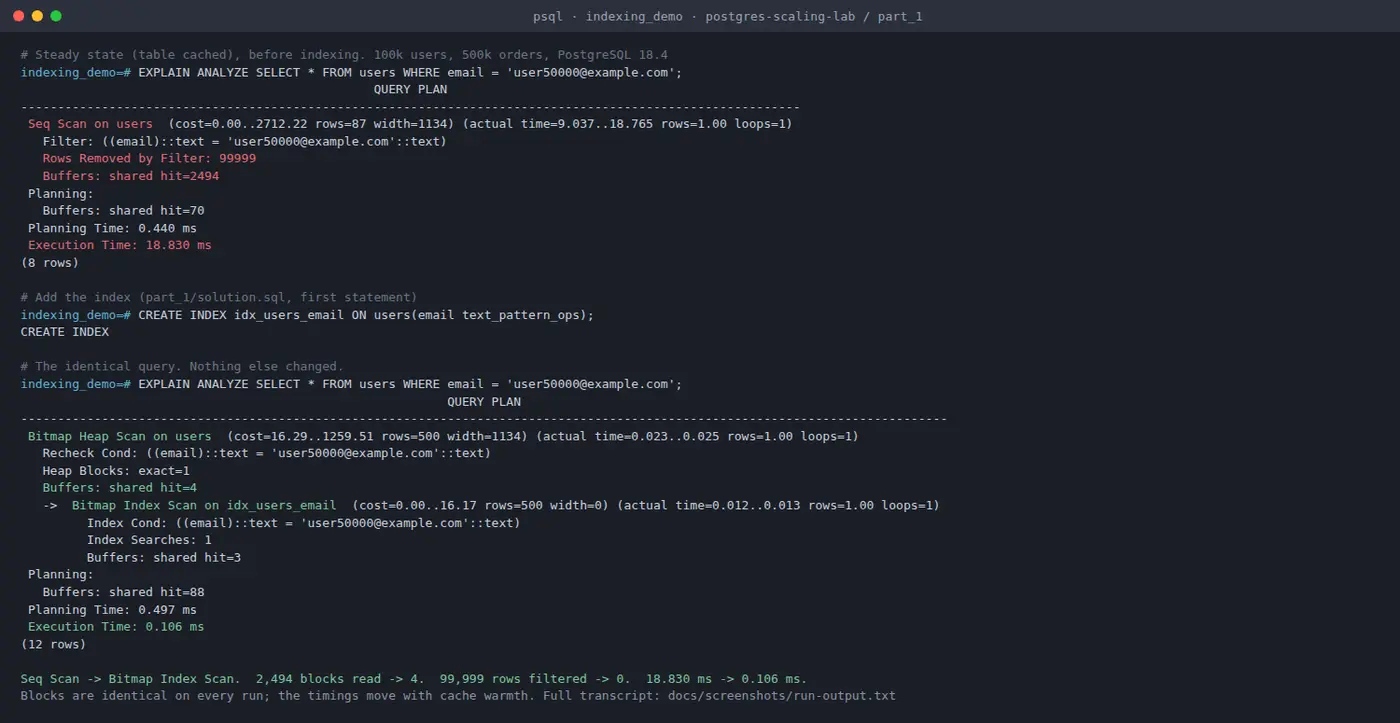
idx_users_email index. The email lookup stops reading all 2,494 blocks of the table and reads 4: a sequential scan that threw away 99,999 of 100,000 rows becomes a bitmap index scan. Warm, that is 18.8 ms to 0.106 ms. The block counts are identical on every run; the timings are not, so the blocks are the honest headline. Full stdout, including the repeat runs, is saved beside the image in docs/screenshots/run-output.txt. The 35 ms to 0.5 ms figure quoted below is the same query on the original course Docker setup; different machine, same fix.Overview
A three-part study of scaling a single PostgreSQL node before reaching for NoSQL: find slow queries and index them, partition a time-series table, then add streaming read replicas with read and write routing in the application.
Key features
- Part 1, indexing: 100k users and 500k orders, using the slow-query log and auto_explain to find offenders, then adding B-tree, text_pattern_ops, GIN pg_trgm, and GIN JSONB indexes.
- Part 2, range partitioning: 600k events, with monthly partitions for 2024 plus weekly partitions for hot data and partition pruning.
- Part 3, read replicas: one primary and two async streaming replicas via pg_basebackup and replication slots, with a psycopg app routing writes to the primary and reads to a random replica.
- Each part is an independent Docker Compose stack.
Results
- Indexing before and after: email exact match 35 ms to 0.5 ms, email prefix 125 ms to 3 ms, amount range 3,100 ms to 1,300 ms, JSONB containment 780 ms to 280 ms.
- Partitioning: monthly analysis dropped from 9,154 buffer blocks to 975 (pruning skips 11 months), and recent-events improved 48%.
- An honest negative: user-activity queries got about 70% slower after partitioning, because they filter on user_id, not the partition key.
- Part 3: the test suite passes 5 of 5, confirming writes hit the primary and reads hit the replicas.