tic-tac-toe-gui
Tic Tac Toe
Noughts and crosses on a computer: two players take turns clicking a 3x3 grid, and the program spots the win, highlights the winning line, and keeps score. This small learning exercise began as an earlier version with a real flaw: it only ever checked whether X had won, so O could complete a line and play carried on regardless. The rewrite checks all eight lines for both players.
Solo work by our founder, Salman Adnan.
Overview
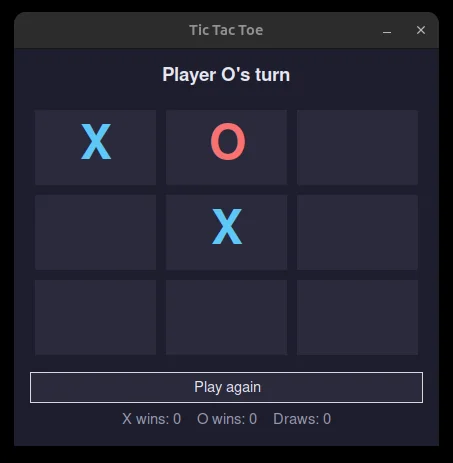
A two-player Tic Tac Toe game with a real graphical interface built in tkinter. It started as a console script with a real bug (the win check only ever tested for X), and this rewrite fixes that properly, detects wins across all eight lines for both players, and tracks score across rounds without closing the window.
Key features
- Two-player hot-seat play on a clickable 3x3 grid of buttons.
- Win detection across all 8 lines (3 rows, 3 columns, 2 diagonals) for both X and O, plus draw detection when the board fills with no winner.
- The winning line is highlighted in place on the board when a game ends.
- A status label shows whose turn it is, and the result when a round ends.
- A "Play again" button resets the board without closing the window.
- A running score tracker (X wins / O wins / draws) that persists across rounds in the same session.
Verification
game.py holds the win/draw logic with no tkinter or I/O dependency, which means it was unit tested directly. check_winner compares both marks against all 8 win lines and returns the winner and the winning line, and main.py holds only display state (colors, labels, the running score dict) without duplicating any of that logic. Running python3 main.py opens the window and plays a full game, confirming the highlighted winning line and score tracker update as designed.