morse-code-converter
Morse Code Converter
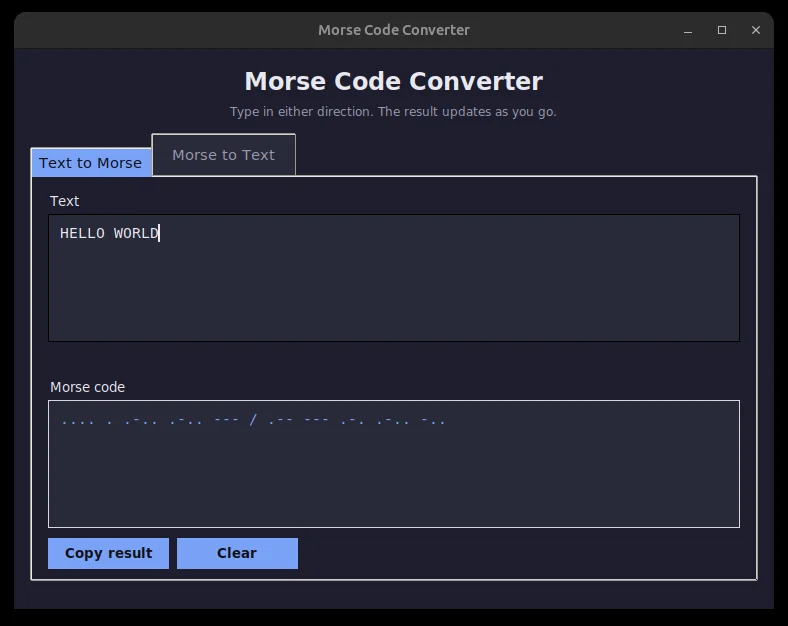
Morse code is the old dots-and-dashes alphabet for sending messages by radio beep or flashing lamp. This desktop app converts ordinary writing into Morse and back again, live as you type, and a Play button flashes the sequence on screen so you can see its rhythm. The starting code was missing the letter V, so it crashed on any word containing one; fixing that is most of the story.
Solo work by our founder, Salman Adnan.
Overview
A desktop GUI that converts text to International Morse Code and decodes Morse code back into text, live, as you type. Started as a practice exercise in dictionary lookups and string processing, extended into a two-tab tkinter app with a visual dot-dash playback of the current message.
Key features
- Two-way conversion: a "Text to Morse" tab and a "Morse to Text" tab, both updating on every keystroke.
- Converts letters (A-Z), digits (0-9), and common punctuation in either direction, case-insensitive on the text side.
- Words are separated with
/, the conventional Morse word separator, in both directions. - Raises a clear error naming the offending character or symbol instead of crashing with a raw
KeyError; the GUI shows it as an inline message. - A "Play" button visually flashes each dot and dash of the current sequence in order, dashes held longer than dots.
- "Copy result" puts the converted text on the system clipboard with tkinter's built-in
clipboard_append.
Verification
The conversion functions live in morse_converter.py with no tkinter import, so they were tested directly with no GUI dependency. The original CLI entry point still works for a one-off check: running python3 morse_converter.py and entering "SOS HELLO WORLD" produces ... --- ... / .... . .-.. .-.. --- / .-- --- .-. .-.. -.., a real run of the script in the repo. There's no automated test file committed; round-trip and error cases were verified manually rather than with an assertion suite.